When you think Spark, think Hadoop. When you think Hadoop, think 4 things:
- Common
- Hadoop Distributed File System (
HDFS) - MapReduce
- YARN
Hadoop Common is the collection of common utilities and libraries that support other Hadoop modules, including Java Archive (JAR) files and scripts required to start Hadoop.
HDFS essentially takes a job done by 1 worker in 10 hours and creates 10 workers and completes the job in 1 hour.
MapReduce is one of those names that’s supposed to make sense and describe what it actually is. The Map is the filtering (“map A to B”), and you might perform some calculations. Reduce then aggregates your data, likely also performing one final calculation. Whether the definition really matches its name is up for debate.
YARN came later to compliment limitations of the MapReduce algorithm and stands for Yet Another Resource Negotiator, probably because YARN happens to be a nice acronym and a word related to thread. What YARN really does is orchestrates jobs, manages packages (resolves dependencies), and implements multiple customized applications.
Hadoop was introduced around 2005 as a result of a Google Whitesheets article and the stuffed animal of Doug Cutting’s son. No one to my knowledge has questioned why Doug Cutting’s son made up the name Hadoop for his stuffed elephant, but here we are.
Apache Spark emerged forreal around 2013, about the same time Big Data was really becoming a thing.
PySpark is just Spark, in Python. You can also use Scala, R, SQL.
You can set up and run pySpark locally, managing that and all its Hadoop and Java dependencies yourself, or you can do yourself justice and just use the Google Cloud Platform‘s (GCP) managed service, DataProc. DataProc also supports Hadoop, Hive, Presto (if you insist), and other things that use Spark/Hadoop clusters — even scaling those clusters — and run Spark/Hadoop jobs, supporting large datasets for querying, batch processing, streaming, and machine learning.
GCP in general has fantastic tutorials, including these things they call codelabs which take you step by step on basics of each of their ten hundred thousand million services. Including DataProc. This is the one I used to get started. They start at the creating a project level, meaning all you need is a (free) Google Cloud Platform account.
The above tutorial was a great, quick way to stroke my ego and reinforce my knowledge of the first few digits of pi. But I wanted to go a step further. Here are a number of other tutorials.
We all know I’m a huge fan of Monte Carlo simulations, so I went with the Apache Spark Monte Carlo tutorial. This tutorial is a bit more complex, so we’ll do it together, with some of my own annotations.
I think all the steps until here are pretty straight forward:

From here, you have three choices. You can use the command line, a REST API, or the user-friendly, clickable Console. Using the Console is very easy, but I highly recommend getting used to the google cloud sdk on the command line. Installation is pretty quick, especially with Google’s (unsurprisingly) meticulous documentaion.
Once the sdk is installed and you have completed gcloud init to configure your machine with your GCP account and project, try the following command:
gcloud dataproc create cluster cluster-bomb-diggity
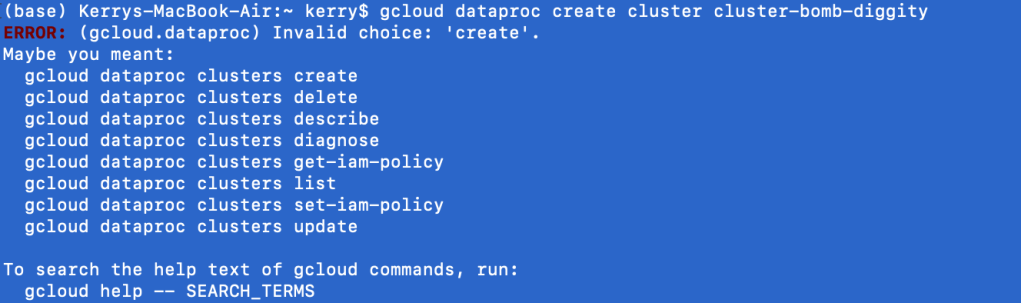
The first lesson of the google cloud sdk at the command line is you will always say gcloud first, followed by the Google service (i.e. dataproc). What comes next is always shifty. clusters create or create clusters? Depending on the service, the English may or may not make sense at the command line. In the case of DataProc, it does not. Regardless, Google is nice enough to give us some hints. clusters create it is.

I’ve entered the noun before the verb begrudgingly, and find I get a new output, which is sometimes a good sign. Like a good programmer, I ignore the warning. I’m kidding. It’s asking me to specify a region, because it doesn’t like to assume. That’s good, you should really never assume things. Google sets a somewhat local region for your default if you don’t bother (which I don’t).
Listen: cloud platforms are cheap because they have tons of servers, ready to go. So if you use 1 or 5, it’s not a huge cost to them, and they pass on the savings to you. This is all people are talking about when they say the cloud is scalable.
Of course, despite calling it “the cloud”, these servers, or virtual machines still physically exist in certain places. It makes the most sense to use servers closest to you, for low latency (the shorter the distance, the faster the response time, but when the scalars are in nanoseconds, who cares unless we’re High Frequency Traders, which I am not). Side note: I’ve never tried using a region across the world, but Google would probably be like, no.
Moving on from this mini-lesson on the cloud, regions, and zones, I did get another error trying to create a DataProc cluster from the command line using the google cloud sdk. You might get a similar error.
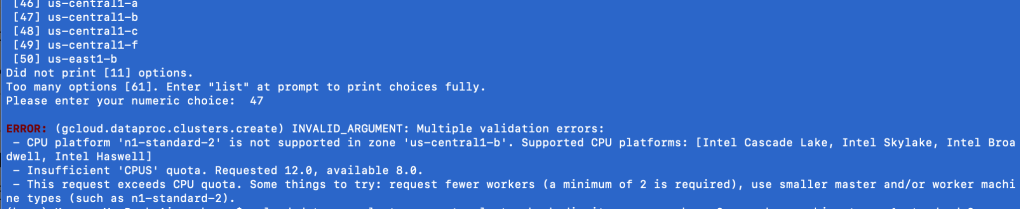
Go back to that image in your head of all the “cloud” servers, chilling by region, by zone. Think of each server individually.
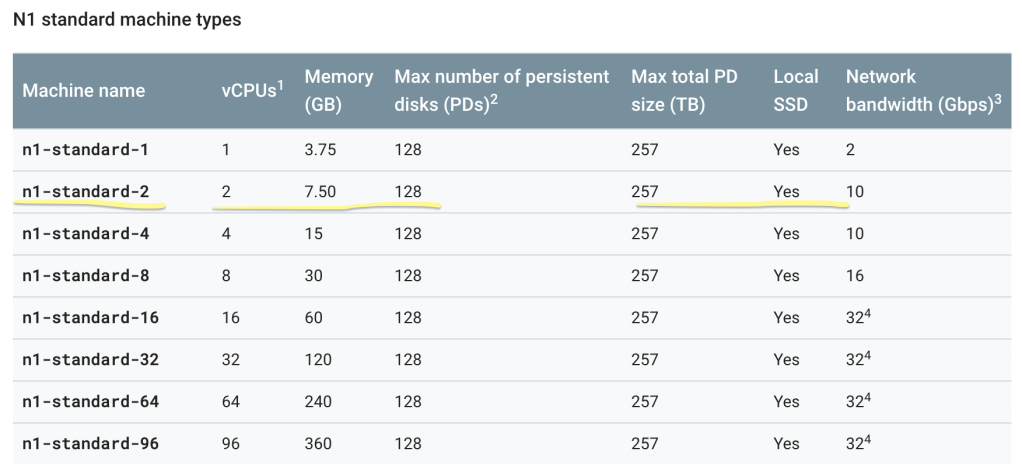
Not all servers are created equal. Some are more powerful than others; naturally, the cheaper, the weaker. As a GCP Free Trial user, n1-standard-2 is your new best friend. It’s the best you can get without racking up a huge bill. If you’re interested in other machine types, Google is very transparent about them, be it size or cost. Here’s the command you need:
gcloud dataproc clusters create cluster-bomb-diggity --num-workers=2 --worker-machine-type=n1-standard-2 --master-machine-type=n1-standard-2

Then you can go into the Cloud Console and see that cluster-bomb-diggity has been created.
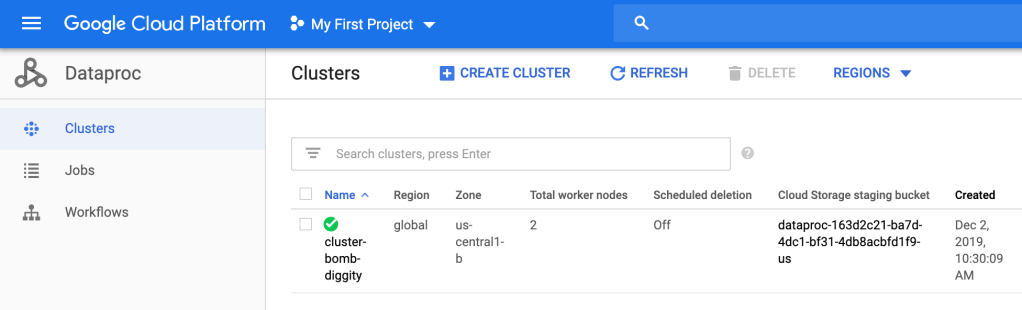
Bomb diggity.
So.. what did we just do? Well, a cluster is an environment where you will have at least one master node and, at least for DataProc, at least 2 worker nodes per master. These nodes will run your jobs lighting fast due to the MapReduce algorithm and HDFS. We have just set up the environment; we created a master and 2 workers on a n1-standard-2 machine, which has 2 (virtual) CPU’s, 7.50 GB, etc.
The next thing they have you do is “quiet the logging.” I assume this is a billing thing, but I don’t really know. Maybe Google knows their logging is borderline overkill, so they’re casually teaching people how to — “quiet the logging”.
This step is by no means necessary in my opinion, so if you have trouble with it, feel free to skip. But it’s great practice, so I encourage you to try.
Ok: your properties file should look something like this, where log4j.rootCategory=INFO (second line).
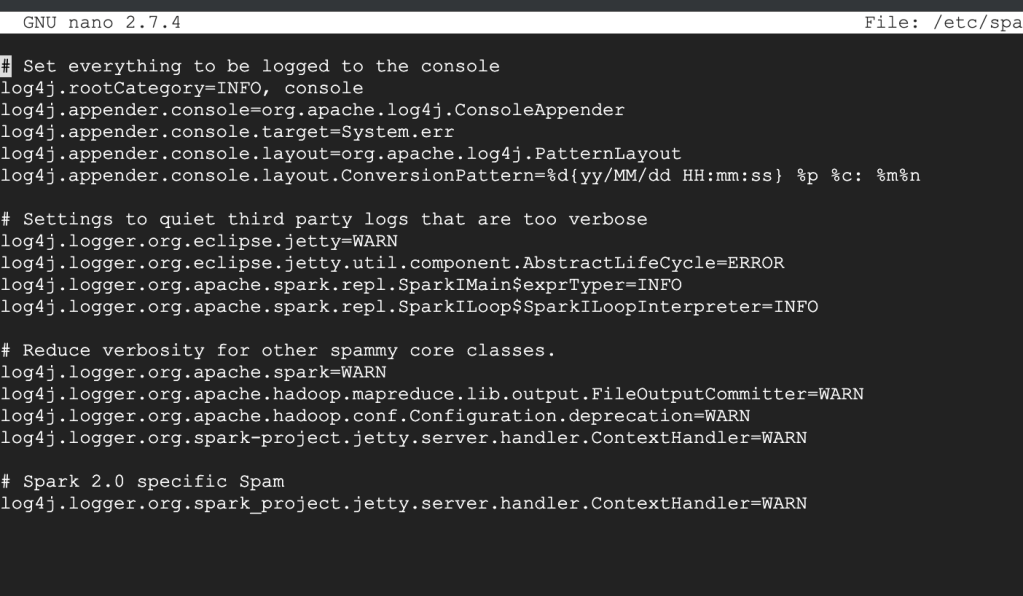
All you’re going to do is set that log4j.rootCategory=ERROR. That’s it.
To get out of this thing, look at the bottom of the screen for instructions. It probably looks foreign, so give it a minute or 2 to sink in. What worked for me is Control+X to exit, then it asked if I want to save changes, which I do. Then hit Enter. It’s good practice to double check your work. To view the file, you can use the cat command:
cat /etc/spark/conf/log4j.properties
You will actually do this 3 times, one for the master, and one for each of your 2 workers.
Stay in the ssh for the master (primary) node. Enter exit to leave the ssh for both workers. After following the remainder of the directions, you should see something like this:
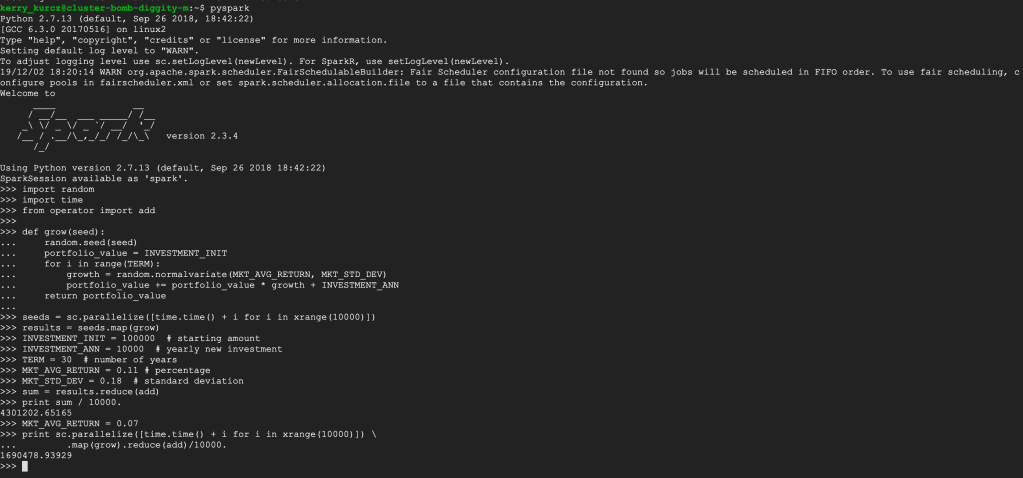
You can follow the Scala instructions next, if you’d like; this server has it installed. Notice how the python version is 2.7. Since python 2.7 is being deprecated, it will be interesting to see what Google services will continue to use python 2 after January 1st, 2020…
Make sure to delete all resources after experimentation so as to not be charged, and to check out this guy talk about Spark in more detail, including examples with DataProc!

 how2py